
Stay Ahead with Smart Reminders in My Ledger Pro
Article
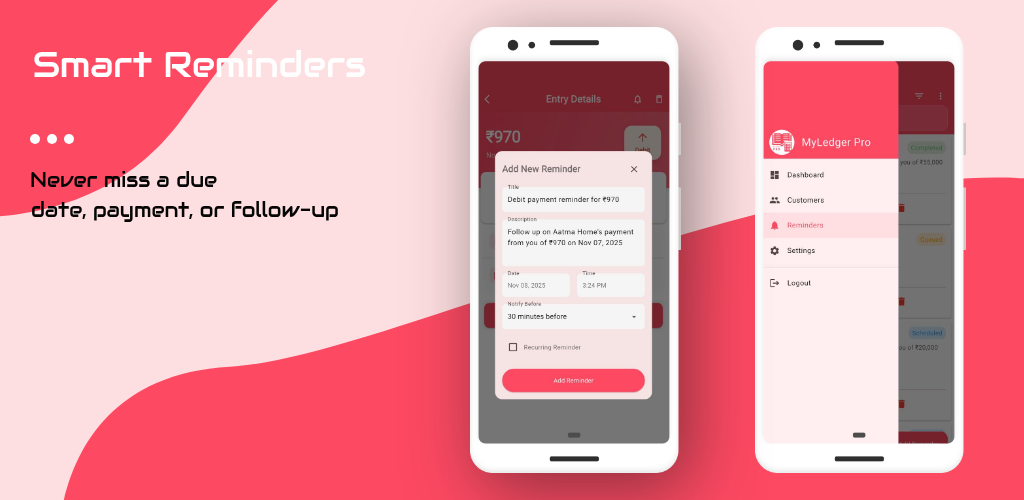
In financial management, forgetting a single due date can lead to penalties, missed opportunities, or even strained client relationships. That’s why My Ledger Pro includes a powerful, built-in Reminder System that helps you stay on top of every important date—whether it’s a payment to make, an amount to receive, or a follow-up task.
With flexible options to set reminders manually or directly from a transaction, you're always in control of your schedule.
🧠 Why Reminders Matter
Time-sensitive tasks are everywhere:
-
Payment due dates
-
Expected customer deposits
-
Scheduled payouts
-
Recurring financial responsibilities
-
Follow-up actions like interest collection or report sharing
Instead of juggling these in a calendar app or your memory, My Ledger Pro lets you manage them in the same place you track your financial activity.
📝 Set Manual Reminders with Ease
Sometimes you need to remind yourself about something that’s not tied to a specific transaction. With manual reminders, you can:
-
Add a custom title and note
-
Select a specific date and time
-
Set repeat frequency: one-time, daily, weekly, or monthly
-
Get notified via app alerts or email
-
Organize reminders by type (payment, task, meeting, etc.)
Whether it’s “Follow up with Rahul,” “Prepare monthly report,” or “Check client balance,” your day stays structured and on track.
🔗 Link Reminders to Transactions
For even more efficiency, you can create a reminder directly from any transaction.
Here’s how it helps:
-
Add a reminder when logging an expense or payment to be made later
-
Set due dates for customer receivables right within the transaction form
-
Receive alerts when a transaction’s due date approaches
-
Track which transactions have pending reminders for better follow-up
This feature is especially useful for:
-
Invoices due next month
-
Post-dated payments or cheques
-
EMI schedules
-
Installments or loan repayments
It keeps your finances and task management tightly integrated.
📲 How Notifications Work
Once a reminder is set, My Ledger Pro takes care of the rest. You’ll receive:
-
Push notifications on your mobile device
-
Email alerts, if enabled
-
A dashboard summary showing upcoming reminders for the day/week
-
Visual badges or icons marking transactions with linked reminders
You’ll never have to dig through data to figure out what needs attention.
🔄 Edit or Cancel Anytime
Life changes fast. That’s why My Ledger Pro lets you:
-
Edit reminder dates, times, or notes at any time
-
Mark them as completed once done
-
Delete or reschedule with just a few taps
-
Filter reminders by status: upcoming, overdue, or completed
You’re in full control of your reminders—without needing a separate to-do app.
✅ Designed for Busy Professionals and Businesses
Whether you're:
-
A freelancer tracking multiple client payments
-
A business owner managing receivables
-
A shopkeeper handling supplier payments
-
An individual organizing personal expenses and tasks
My Ledger Pro helps you turn due dates into done deals.
💼 Real-World Examples
-
Reminder for receiving advance from customer "Raj" on 5th October
-
Linked reminder for rent payment transaction set for every 1st of the month
-
Manual reminder to prepare quarterly financial summary report
-
Alert set for interest collection from multiple customers on different days
🎯 Final Thoughts
Reminders aren’t just alerts—they’re smart tools that protect your time, improve follow-ups, and make sure nothing slips through the cracks.
With My Ledger Pro, you can stay focused on growing your business or managing your responsibilities—while the app keeps track of your schedule.
Get started today and discover how smooth, secure, and stress-free your financial tracking can be.
About the Author
Er. Govind Samrow is a contributor to My Ledger Pro blog.